

Choosing the right quality management system (QMS) is like picking the right engine for your business vehicle – you want power, reliability, and the ability to take you where you want to grow. For small businesses, this decision is especially critical.
The wrong QMS can create headaches: costly implementation, frustrated users, inefficient workflows, or even compliance risks. But the right Quality Management Software becomes a backbone for quality excellence, growth, and customer trust.
This guide will walk you through exactly how to choose a QMS, covering each major step from understanding your needs to final decision criteria. Whether you’re hearing about QMS for the first time, or you’re ready to upgrade your existing setup, this guide helps you navigate “Choosing Quality Management Software with clarity.”
To set the context better, let us first understand basics of QMS.
What is QMS?
A Quality Management System isn’t just software—it’s a structured framework that helps organisations:
- Define quality policies and objectives
- Document processes and procedures
- Track quality issues and corrective actions
- Enable continuous improvement
Why Do Small Businesses Need a QMS?
Before diving into how to choose a QMS, it’s worth understanding why a QMS matters:
- A well-implemented QMS improves internal efficiency by standardising processes and reducing mistakes.
- It supports strong document control so everyone works from the latest procedures.
- It helps small businesses comply with industry standards like ISO 9001, which can be a prerequisite for supplier contracts.
- It fosters a culture of continuous improvement, instead of reactive firefighting. (qad.com)
- It brings repeat business as they consistently get standardised products.
- It helps organisation to detect defects early and act proactively upon it.
- It helps organisation to deploy the right candidate for the job based on their training, skills and experience.
- It fosters continuous improvement.
- It reduces reworks, rejections, and defects – helping an organisation to optimise bottom line.
Given these benefits, selecting the right quality management software is a strategic investment, not just a checkbox.
How to Choose a Quality Management System?
Choosing a Quality Management System is a long process. It is not a decision to be taken, it hastes. It requires proper planning, need mapping and budget allocation along with involvement of management and team members.
Following QMS Selection Checklist can help you to choose the right option:
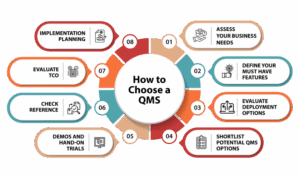
Step 1: Assess Your Business Needs
This is the first step in actually choosing a Quality Management System for your business.
Start with a needs assessment:
- What quality challenges are you facing?
- Are your current processes breaking down?
- Do you need better document control, CAPA workflows, audit trails, training tracking, or risk management?
- Are you aiming for a compliance certification like ISO 9001?
This internal review helps you define a clear picture of why you need QMS software and what problems it must solve. According to Gartner, documenting these goals and process gaps helps in much more effective selection.
Example: A small medical device startup may emphasise on audit reporting more than risk scoring whereas a finance firm may prioritise document control.
Since the needs of both the organisations are different, their solutions will be distinct.
Step 2: Define Your Must-Have Features
Once your needs are clear, list the features your next QMS must include. For small businesses, common must-haves typically include:
- Document control and version history: Centralise procedures so everyone follows the current version.
- Corrective and Preventive Action (CAPA): Helps your team respond to issues and prevent repeats.
- Risk management tools: Identify and mitigate quality risks early.
- Training tool: Ensure employees are always up to date.
- Audit trails & compliance reporting: Critical for standards like ISO 9001.
- User-friendly, scalable interface: Especially important for small teams with limited IT support.
The combination of features you prioritise will vary based on your industry and growth plans – but writing them down makes your evaluation clear.
Step 3: Evaluate Deployment Options
Today’s QMS software typically comes in two deployment models:
- Cloud-based (SaaS): Accessible from any device, easier to maintain, and typically lower upfront cost. The market is trending strongly toward cloud adoption.
- On-premise: Data hosted locally, gives you control but often requires more IT resources.
For small businesses with limited tech teams, cloud-based QMS is often a smarter choice due to ease of deployment and maintenance. According to Market Growth Reports – approximately 70% of small and medium enterprises choose cloud QMS for its affordability and scalability.
Step 4: Shortlist Potential QMS Options
With your requirements defined, start researching QMS vendors that align with your needs. At this stage don’t worry about pricing – instead focus on requirement fit. While shortlisting, ask some vital questions to the vendor, like:
- Does their solution cover your must-have features?
- How scalable is the system as your business grows?
- Does the software integrate with systems you already use?
- What security and compliance protections are in place?
Shortlist at least three to four vendors for better evaluation. This prevents early commitment and also gives a chance to explore a range of solutions available.
Step 5: Demos and Hands-On Trials
Once you have shortlisted, arrange demos parallelly. Vendors should walk you through the software focused on your requirements.
During demos:
- Check the workflows that are relevant to your business
- As vendors to show realistic scenario and not only the generic workflow
- Request a trial. This hands-on time will reveal the usability, intuitiveness and limitations before you buy the product
There may be multiple meetings and follow ups before finalising but trial and demo let you know how easily eQMS Software can imbibe your organisation’s workflow and how easy your team can adopt the system. The success of any project depends a lot on the acceptance of the team.
Step 6: Check References & Real-World Fit
Before final selection, reach out to existing users similar to your business in size or industry. User feedback reveals:
- Support responsiveness
- Real adoption challenges
- ROI delivered vs expectation
This step is a reality check for the true market deliverables of the vendor. There are multiple sources where you can read reviews about the product. Reviews on these sources like G2, Gartner, TrustRadius, Capterra, Software Suggest, GetApp and so on can give you a fair glimpse of market reputation of the vendor you selected.
Step 7: Evaluate Total Cost of Ownership (TCO)
Many times, a product fits well and seems in budget. But when the actual deal is signed, the overall costs seem shooting the budget. This is because as an organisation you consider only license fees as the product cost, whereas as a vendor there are multiple costs involved. Hence, effectively the total cost of ownership (TCO) goes up.
Hence, consider:
- Implementation costs
- Training and onboarding
- Scalability fees
- Support contracts
- Data migration expenses
This calculation and understanding of TCO helps you to either consider actual investment or negotiate better.
Step 8: Implementation Planning
Once you’ve chosen your QMS, plan implementation carefully:
- Establish a deployment timeline
- Define responsibilities
- Monitor and refine workflows
It is recommended to define the plan before the actual project kicks off. It sets a realistic goal, and you have an actual timeline for go-live phase.
Conclusion
Choosing a QMS Software for Manufacturing is a crucial decision for the quality quotient of your organisation and the decision should be well-calculated. The right selection can give you a competitive edge in the market.
QualityPro by TecWork Global Business Solutions is an eQMS that offers multiple benefits.
Customers of QualityPro have recorded 30% lower operational cost, 40% lesser customer complaints, and 50% lesser major quality failure in due course of time. Not only this, the software has intuitive dashboards and interface which cuts down the learning curve and improves ROI.
You can take the firsthand experience of the software by Requesting a free demo here.